| Nov 26, 2026 |
Thanksgiving
Closed
|

Department Numbers:
Sales: 854-600-1693
Service: 854-600-1694
Parts: 854-600-1689
Body Shop: 854-600-1694
Quick Lane: 854-600-1694
Work Trucks / RV Express Service: 843-905-3334
Normal Department Hours:
| Mon: | 9:00a - 7:00p |
| Tue: | 9:00a - 7:00p |
| Wed: | 9:00a - 7:00p |
| Thu: | 9:00a - 7:00p |
| Fri: | 9:00a - 7:00p |
| Sat: | 9:00a - 6:00p |
| Sun: | Closed |
| Nov 26, 2026 |
Thanksgiving
Closed
|
| Mon: | 7:30a - 6:00p |
| Tue: | 7:30a - 6:00p |
| Wed: | 7:30a - 6:00p |
| Thu: | 7:30a - 6:00p |
| Fri: | 7:30a - 6:00p |
| Sat: | 8:00a - 1:00p |
| Sun: | Closed |
| Nov 26, 2026 |
Thanksgiving
Closed
|
| Mon: | 7:30a - 6:00p |
| Tue: | 7:30a - 6:00p |
| Wed: | 7:30a - 6:00p |
| Thu: | 7:30a - 6:00p |
| Fri: | 7:30a - 6:00p |
| Sat: | 8:00a - 1:00p |
| Sun: | Closed |
| Nov 26, 2026 |
Thanksgiving
Closed
|
| Mon: | 8:00a - 5:00p |
| Tue: | 8:00a - 5:00p |
| Wed: | 8:00a - 5:00p |
| Thu: | 8:00a - 5:00p |
| Fri: | 8:30a - 5:00p |
| Sat: | Closed |
| Sun: | Closed |
| Nov 26, 2026 |
Thanksgiving
Closed
|
| Mon: | 8:00a - 6:00p |
| Tue: | 8:00a - 6:00p |
| Wed: | 8:00a - 6:00p |
| Thu: | 8:00a - 6:00p |
| Fri: | 8:00a - 6:00p |
| Sat: | 8:00a - 1:00p |
| Sun: | Closed |
| Nov 26, 2026 |
Thanksgiving
Closed
|
| Mon: | 7:30a -6:00p |
| Tue: | 7:30a -6:00p |
| Wed: | 7:30a -6:00p |
| Thu: | 7:30a -6:00p |
| Fri: | 7:30a -6:00p |
| Sat: | Closed |
| Sun: | Closed |
| Nov 26, 2026 |
Thanksgiving
Closed
|

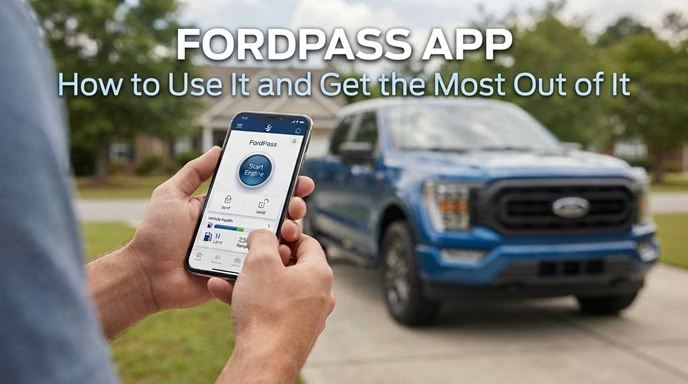
Ford has made life easier for vehicle owners with the FordPass app—a powerful tool designed to enhance your driving experience. Whether you're looking to monitor your vehicle’s health, lock/unlock your car, or even schedule service appointments, the FordPass app puts all these capabilities at your fingertips. But if you’ve just downloaded it, you might be wondering: How do I make the most of all these features?
At Beach Ford, we’ve put together this guide to help you navigate the FordPass app and get the most out of it. From remote start to service scheduling, we’ll show you how to maximize the app’s full potential to make managing your Ford easier than ever.
The FordPass app is a comprehensive mobile app designed to enhance your ownership experience with Ford vehicles. Whether you're driving a Ford F-150, Ford Escape, Ford Mustang, or any other Ford model, this app allows you to remotely control and monitor various aspects of your vehicle. It’s available for download on both iOS and Android devices, and it’s completely free to use.
The FordPass app provides a variety of functions to make your life easier, including remote vehicle management, real-time vehicle health updates, finding fuel or charging stations, and even scheduling service appointments. Think of it as your personal assistant for everything Ford.
What It Does:
Why It Works:
Remote access to your vehicle provides convenience and peace of mind, especially when you're in a hurry or in unfamiliar places.
What It Does:
Why It Works:
Staying on top of your vehicle's health helps prevent issues before they become bigger problems, and with reminders, you'll never miss an important service.
What It Does:
Why It Works:
Scheduling service through FordPass makes the process faster and more convenient, ensuring your vehicle gets the care it needs without needing to call or visit in person.
What It Does:
Why It Works:
With the ability to find nearby fuel or charging stations, you can make sure you're never far from a place to fill up or charge, helping you save time and money.
What It Does:
Why It Works:
FordPass Rewards adds extra value to maintaining your vehicle, turning every service appointment into an opportunity to earn savings for the future.
What It Does:
Why It Works:
Knowing that help is just a tap away offers added peace of mind, whether you’re on a long road trip or simply running errands around town.
Make sure your FordPass app is always updated to the latest version to ensure you have access to new features, security improvements, and bug fixes.
If you own more than one Ford vehicle, you can sync them all to your FordPass account. This allows you to monitor and control multiple vehicles with a single app, making it even easier to manage your entire fleet.
Customize notifications for important vehicle maintenance, fuel levels, and more, so you’re always in the know. Set alerts for tire pressure drops or oil life status, so you can stay proactive about your vehicle’s care.
Review the Vehicle Health Report available in the app to get a detailed summary of your car’s condition, including any areas that may need attention.
Don’t forget to sign up for the FordPass Rewards program and start earning points for every service visit. These points can be used for discounts or even a new vehicle purchase.
If you’re having trouble with your FordPass app or need help setting it up, Beach Ford is here to assist. Our team can guide you through the setup process and make sure you’re getting the most out of all the app’s features. Whether it’s scheduling a service appointment, checking on your vehicle’s health, or unlocking your car remotely, we’ll make sure you’re ready to go!
Ready to enhance your Ford ownership experience? Download the FordPass app from the App Store or Google Play, and start taking full control of your vehicle’s features and performance. With FordPass, convenience is just a tap away.
We will be closed 11/26/26 for Thanksgiving